
DOOH Store Locator Creative: Where to Put "Find Us" Info on C-Store and ATM Screen Ads
Vistar Media, Omnicom Media, and Annalect published research on 23 Sep 2026 about store locators in programmatic DOOH creative: top and bottom placements beat the middle, and a location pin and high contrast helped. Here is what the study measured, where its limits are, and a practical creative checklist for local advertisers on convenience-store and ATM screens.
Take 10 Media ·
At a Glance
On 23 September 2026, Vistar Media, with Omnicom Media and Annalect, published “The store locator effect: How store information moves audiences from screen to store”. The study tested where to put “find us” information on a programmatic digital out-of-home (DOOH) ad: at the top, in the middle, or at the bottom, against a control ad with no location details.
The short version: top and bottom beat the middle, a location pin and high contrast helped, and the biggest effect was on impulse-buy CPG products like sweets and chocolate. The study measured intent in a forced-exposure panel in the Netherlands, not sales on US screens.
For a local business or brand buying a few convenience-store or ATM screens, this is a practical creative note, not a price or a promised lift. This post covers what was tested, what was found, what the study does not show, and a checklist you can apply to your next video.
Who This Is For
| Audience | Why it matters |
|---|---|
| Nearby businesses (pizza, car wash, salon, dentist, auto shop) | Your screen ad has one job beyond awareness: tell people where you are. |
| CPG and beverage brands sold in the same store | The “location” is often the store the viewer is standing in. The study’s strongest effect was on impulse buys. |
| Franchisees and multi-location brands | You need a different address for different venues, with or without dynamic creative. |
| Not for | Anyone looking for a CPM, a guaranteed lift, or proof that the study’s numbers hold on US c-store screens. The sources do not provide those. |
Book named convenience-store and ATM venues on self-serve. For a short same-day message on one screen, bought by scanning that screen’s QR code, see Instant Ads.
What Was Tested
From the press release and the research page:
- Who ran it: Vistar Media’s Creative Studio, in partnership with Omnicom Media and Annalect.
- Panel: 7,200 consumers aged 18 to 59, based in the Netherlands, between February and April 2026.
- Design: forced exposure. Participants were randomly shown an image of an outdoor environment with a vertical 1080 x 1920 screen. Depending on the group, the screen carried a control creative with no store locator, or a version with store information at the top, middle, or bottom.
- Categories: Retail, Quick Service Restaurant (QSR), and Consumer Packaged Goods (CPG).
- What was measured: visit intent for Retail and QSR, purchase intent for CPG, plus brand recognition, brand appreciation, and ad appreciation.
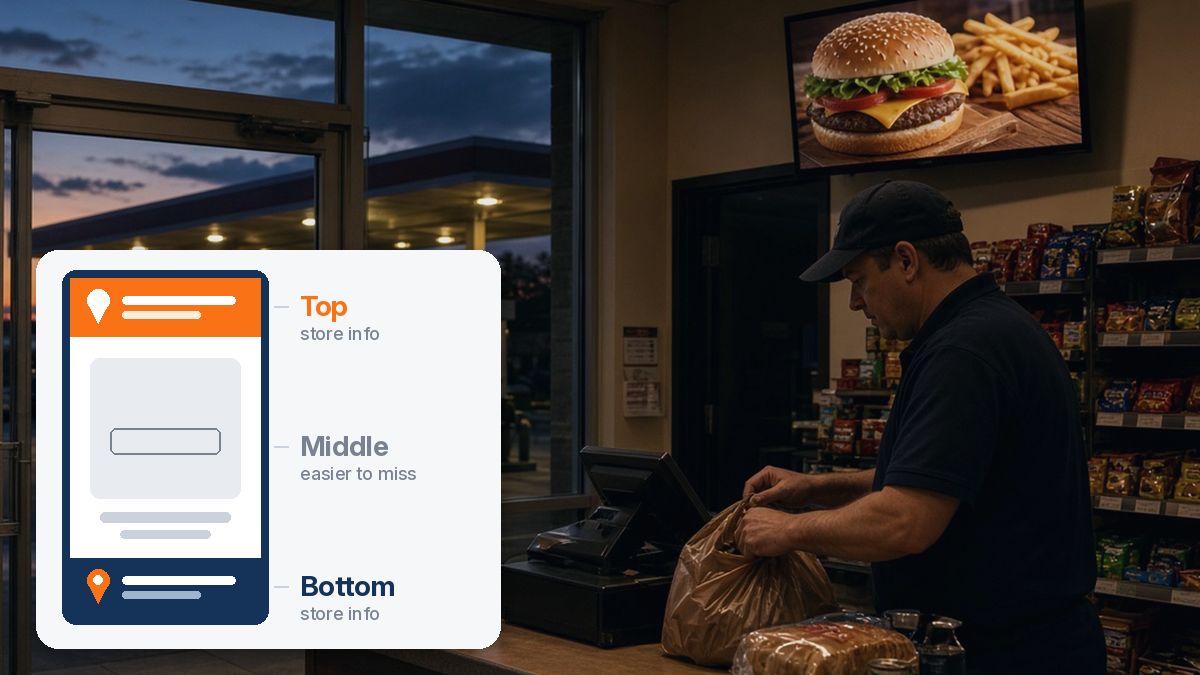
The research page describes the three placements this way: at the top, store information sits close to the brand’s logo, where attention goes first; in the middle, it is blended into the main message; at the bottom, it sits below the primary creative.
What They Found
All figures below are Vistar’s, Omnicom Media’s, and Annalect’s, from the release and research page. Lifts are against the control creative.
| Finding | Figure reported |
|---|---|
| Placement overall | Top and bottom consistently outperformed the middle |
| CPG, top placement | +20% purchase intent (strongest overall for CPG) |
| Retail and QSR, bottom placement | +9% visit intent (strongest overall for Retail and QSR) |
| Retail, bottom placement | +35% visit intent |
| QSR, bottom placement | +24% visit intent |
| CPG impulse buys (e.g. sweets, chocolate) | +116% purchase intent at bottom, +110% at top (the release says “over 110%”) |
| Familiar location pin | +16% visit intent |
| High-contrast store information | +10% visit or purchase intent, depending on category |
Two more findings are worth reading closely:
- Why the middle loses. The research page says that in the middle, store information competed with headlines, imagery, and other visual elements. Top and bottom placements gave it its own visual space.
- Reseller branding can split attention. When a store locator prominently featured another brand, such as a supermarket, dealership, or retailer, brand recognition for the advertised product sometimes declined, even when intent stayed strong. The researchers flag this for newer or emerging brands. Adding store information did not hurt brand or ad appreciation overall, according to the research page.
What the Study Does Not Show
- Not sales. It measured stated visit and purchase intent after a forced exposure, not store visits, redemptions, or revenue.
- Not US c-store or ATM screens. The panel was in the Netherlands and saw an image of an outdoor vertical screen. Indoor screens near a checkout, a cooler, or an ATM are a different setting.
- Not every format. Vistar’s research page says the results reflect the screen format, creatives, and environments tested and “should therefore be viewed as evidence of the impact these creative choices can have, rather than a universal rule for every DOOH format or screen.”
- Not a price. Neither page publishes a CPM, a rate card, or a cost for dynamic creative.
Applying It to a C-Store or ATM Screen Ad
The study tested outdoor screens that point people to a store somewhere else. Inside a convenience store, the viewer is already in a store. The checklist below is our translation of the study’s lessons to that setting. It is a planning frame, not a tested result.
1. Decide what “location” means for your ad
- Your product is sold in this store (snacks, drinks, energy shots): the store locator becomes a line like “Sold here” or “At the cooler.” This is closest to the study’s impulse-buy CPG case. Only say “sold here” on venues where it is true.
- Your business is nearby: use the address and a short direction cue (“2 blocks north on Main”). Keep it to what someone can remember on the walk out.
- You have several locations: each venue should show the nearest one. If you are not using dynamic creative, make one version of the video per area and book those venues as separate campaigns.
2. Give store information its own band at the top or bottom
Do not tuck the address into the middle of the frame next to the product shot and the offer. That is the placement the study found easiest to overlook. A solid band at the top (near your logo) or the bottom keeps it separate.
3. Use a pin and high contrast
A familiar location pin and strong contrast between the store band and the rest of the frame were the two design elements Vistar highlights. In a bright store, contrast matters even more for readability. Our guide to QR codes on in-store screens covers legibility and scan distance if you add a code to the same band.
4. Keep extra branding light if you are a new brand
If your ad mentions the store chain or a reseller, the study suggests it can divide attention. When the goal is recognition for your own brand, let your logo lead and keep the retailer mention small.
5. Keep the video short and readable without sound
Store screens are viewed in passing. Our self-serve video guide recommends short vertical video designed to work without audio. Put the store band on screen for the whole spot, not just the last second. For why the point of decision matters, see point-of-decision marketing with in-store video.
Test It on Your Own Screens
The study gives you a hypothesis, not a result. A simple way to check it on a small budget:
- Run two versions of the same ad, one with the store band at the top or bottom and one without (or with the info mid-frame), on comparable groups of venues for the same dates. Our matched-market testing guide explains how to pick the groups.
- Give each version a way to count response: a QR code with its own link, a short promo code, or a “mention this ad” offer.
- Compare against your own baseline, then read how DOOH drives in-store sales and DOOH attribution without device IDs for other ways to measure.
Keep any lift you see tied to your own flight, venues, and dates. Do not plan budget on the study’s percentages.
What This Article Is Not
- Not a rate card or a CPM. No price appears in the sources used here.
- Not a Take 10 result. Every figure belongs to the Vistar, Omnicom Media, and Annalect study.
- Not a claim that Take 10 offers dynamic creative optimization. The “one version per area” approach above is a manual way to match creative to venues.
- Not a statement from Vistar about c-store or ATM screens. Applying the findings to those screens is this article’s planning frame.
Sources
- Vistar Media — Vistar Media research finds inclusion of store locators in DOOH advertising directly impacts visit and purchase intent (Amsterdam, 23 September 2026).
- Vistar Media — The store locator effect: how store information moves audiences from screen to store (research page with category splits, method, and limitations).
Next Steps
Pick the venues near your business or where your product is sold, make the store band part of the design from the start, and plan how you will count response before the flight begins.
On self-serve, you choose the convenience-store and ATM venues and the dates. Start in the Take 10 Media Ad Portal; your account and video still go through review before the campaign goes live. For a same-day promo on a single screen, Instant Ads are the shorter path.
Related reading: QR codes on in-store screens · point-of-decision marketing · how DOOH drives in-store sales · convenience store digital signage advertising.
Frequently asked questions
What did Vistar Media's store locator research find?▼
Vistar Media, with Omnicom Media and Annalect, published "The store locator effect" on 23 September 2026. It found that adding store locator information to programmatic DOOH creative can increase visit and purchase intent, and that the size of the effect depends on where the information sits, how it is designed, and the business category. Top and bottom placements consistently outperformed the middle of the creative.
Where should store information go on a DOOH ad?▼
In this study, at the top or the bottom. Vistar reports that in the middle, store information competed with headlines and imagery and was easier to overlook. For CPG campaigns, top placement drove the strongest overall purchase intent lift (20% vs. control). For Retail and QSR campaigns, bottom placement drove the strongest overall visit intent (9% vs. control).
Does a location pin or high contrast make a difference?▼
Vistar reports that a familiar location pin lifted visit intent by 16%, and high-contrast design between the store information and the rest of the creative lifted visit or purchase intent, depending on category, by 10%. These are the study's figures for its own test creatives, not a benchmark for every screen.
How was the store locator study done, and what are its limits?▼
It was a forced-exposure study of 7,200 consumers aged 18 to 59 in the Netherlands, run between February and April 2026. Participants were shown an image of an outdoor environment with a vertical 1080 x 1920 screen, carrying either a control creative or one of three store locator placements. It measured visit and purchase intent, not store visits or sales. Vistar itself says the results reflect the formats and creatives tested and are not a universal rule for every DOOH format or screen.
How can outdoor advertising target people in specific locations and moments?▼
In programmatic DOOH, one method Vistar describes is Dynamic Creative Optimisation (DCO), which serves different messages based on where audiences are and what is happening around them. Vistar calls the store locator, which points people to their nearest retailer, restaurant, or dealership, one of the most widely adopted DCO applications. On a small self-serve buy, the simpler version is choosing specific venues and making the creative match them.
Does this apply to digital signage for c-stores?▼
Only as a planning guide. The study tested outdoor screens in the Netherlands, not convenience-store or ATM screens in the US. The creative lessons that travel well are simple: give store information its own band at the top or bottom, use a pin icon, and make it high contrast. Whether they lift results on your screens is something to test on your own flight.
How do I find and purchase out-of-home advertising locations near me?▼
On Take 10 Media self-serve, you choose named convenience-store and ATM venues and your dates in the Ad Portal, upload your video, and the account and creative go through review before the campaign goes live. For a same-day message on one screen, Instant Ads are bought by scanning that screen's QR code.
Does this article include a CPM or a Take 10 result?▼
No. Vistar's release and research page publish no price, CPM, or rate card, and do not mention Take 10 Media. Every lift figure here belongs to the Vistar, Omnicom Media, and Annalect study, not to Take 10 campaigns.
Ready to launch your campaign?
Reach shoppers at the point of decision with self-serve video ads across 1,500+ premium retail and ATM locations.