
QR Codes on In-Store Screens: Who Benefits and When to Use Them
QR code in-store advertising for local brands, Instant Ads consumers, and hosts—benefits, use cases, and measurement—plus a short explainer on Instant Ads vs offer QRs.
Take 10 Media ·
At a Glance
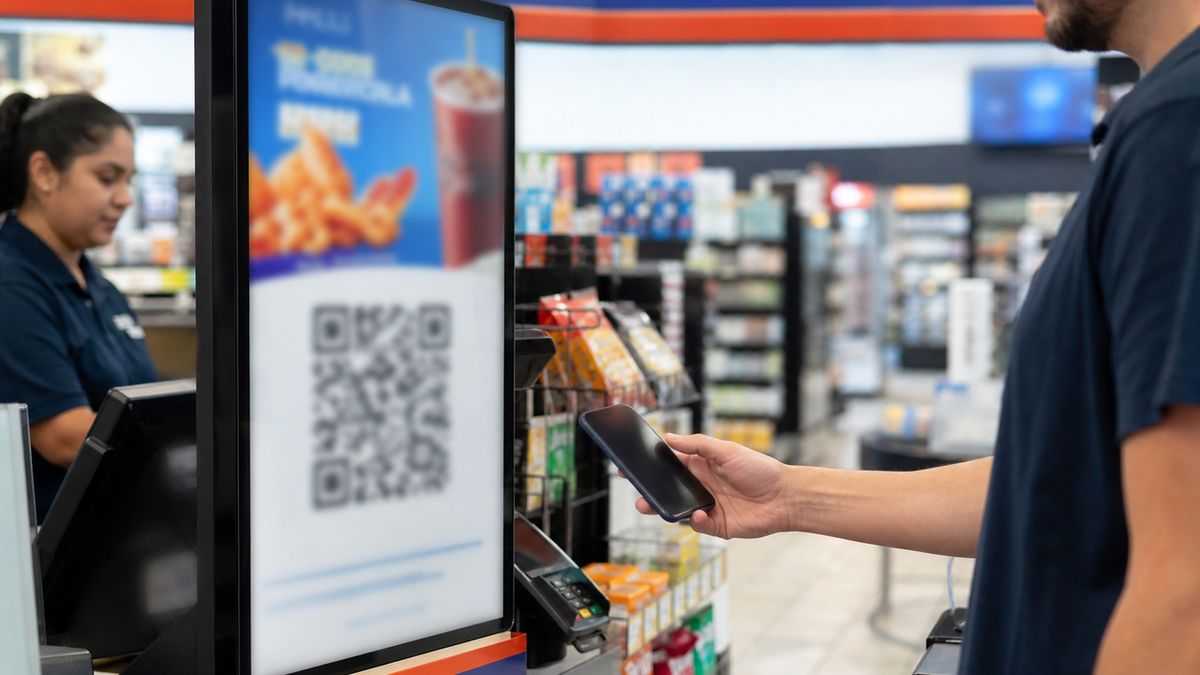
QR code in-store advertising has transformed passive checkout screens into interactive, high-engagement portals. In physical retail, where consumer attention is concentrated yet fleeting, QR codes serve as the ultimate bridge between offline environments and digital experiences. On the Take 10 Media network, this technology powers two functions: (1) Instant Ads, which allow consumers to purchase screen time on the display in front of them, and (2) brand offers, which enable local businesses to deliver instant coupons, menus, or landing pages.
By leveraging dynamic QR codes on digital out-of-home (DOOH) screens, marketers can track, measure, and optimize real-world engagement with a level of precision that traditional outdoor advertising could never support. This guide explores who benefits from this technology, key use cases, and the creative guardrails required to maximize scan rates in busy retail environments.
Who Benefits from QR-Enabled Retail Screens?
The integration of QR codes into checkout-adjacent displays creates a multi-sided ecosystem where every participant derives unique, tangible value.
- Consumers (Instant Ads Buyers): Shoppers can “take over” the screen on impulse without downloading an app. Scanning the QR code lets them upload a photo, celebrate a birthday, or share a family picture, creating a memorable, shareable moment in minutes.
- Local Brands & SMBs: In-store screens act as a targeted local advertising channel. A QR code embedded within a planned video creative acts as a physical “click,” allowing brands to track offline-to-online (O2O) conversions and drive immediate foot traffic.
- Store & ATM Hosts: Every consumer-purchased Instant Ad generates incremental, high-margin revenue for the host. Interactive screens also keep customers entertained during checkout dwell times, reducing perceived wait times.
- Marketing Agencies: Agencies gain granular campaign measurement, allowing them to monitor scan rates across different times, days, and locations. This physical-to-digital data helps optimize multi-channel campaigns.
Two QR Jobs (Do Not Mix Blindly)
To deploy successful QR campaigns, marketers must recognize that QR codes perform two separate “jobs” on retail screens. Mixing these functions or failing to establish a clear visual hierarchy will confuse shoppers and degrade scan rates.
- Job 1: The Instant Ads QR (Network Player CTA): Built directly into the screen player’s sidebar or corner overlay, this dynamic QR sells local screen time directly to the immediate audience (e.g., “Put your photo on this screen!”). It deep-links to the automated, mobile-friendly Instant Ads upload and payment flow.
- Job 2: The Offer QR (Embedded Brand Creative): Generated and embedded directly inside an advertiser’s custom video creative, this QR drives traffic to a brand’s external coupon, landing page, menu, or social media profile (e.g., “Scan for 20% off”).
The Golden Rule of In-Store QR Design: Never combine these two jobs into a single call to action. The on-screen layout must make it immediately obvious whether the shopper is scanning to buy screen time (Instant Ads) or scanning to redeem a brand discount (Offer QR).
Use Cases That Work at Checkout
Because checkout shoppers are actively transacting or preparing to leave, the most successful use cases require minimal cognitive load and offer immediate, high-value outcomes.
| Use Case | Target Audience | QR Destination | Why It Works at Checkout |
|---|---|---|---|
| Selfie / Celebration | Friends, families | Instant Ads flow | Captures impulse desire to share a fun, public moment. |
| Point-of-Sale Discount | In-store shoppers | Mobile coupon page | Drives immediate product trial and increases basket size. |
| Interactive Menu / Hours | Hungry patrons | Fast-loading web page | Solves immediate dining or planning needs nearby. |
| Sweepstakes Entry | Local shoppers | Simple mobile form | High perceived value with low friction; captures local leads. |
| Store Finder / Directions | Visitors, commuters | Maps deep link | Helps shoppers find adjacent sister locations or partners. |
| Same-Night Event Tickets | Entertainment seekers | Ticket booking page | Leverages immediate geographical proximity to drive sales. |
Industry Benchmarks: The Power of Checkout-Adjacent Messaging
In the broader retail media landscape, checkout-adjacent and till-adjacent digital signage is highly effective. According to industry studies of retail media networks, displaying targeted, contextually relevant brand messages at the point of purchase is where many retail-media case studies report lift versus static signage—industry context, not Take 10 Media guarantees.
Furthermore, campaigns that bridge the physical-to-digital divide using offline-to-online (O2O) mechanisms—such as scannable QR codes—experience significantly higher engagement rates than those relying on text-based URLs or search prompts. By placing a scannable, high-contrast QR code directly in the shopper’s line of sight during checkout dwell times, brands can seamlessly convert passive physical attention into active digital relationships.
Explainer: The Instant Ads Scan Flow
Instant Ads appeal to retail shoppers due to their optimized, frictionless flow from the moment a QR code is spotted to when the content appears on screen.
- Spot the QR: A customer waiting in line or standing at an ATM notices the Instant Ads prompt on the screen and scans the QR code.
- Upload Photo: The QR deep-links to a mobile page mapped to that screen. The shopper uploads a photo from their camera roll.
- Moderation: The image is reviewed for brand safety before checkout. Rejected submissions do not proceed to payment.
- Select Duration & Pay: The shopper chooses a duration tier from the live quote and completes payment via Stripe Checkout.
- Play on Screen: After payment, the creative is scheduled on that screen for the purchased duration.
Creative Guardrails: Designing for High-Scanned Retail Displays
Scanning a QR code on a vertical digital display in a brightly lit store is fundamentally different from scanning a code printed on static paper. Advertisers must design creatives with physical constraints in mind to ensure high engagement.
- Size and Contrast are Non-Negotiable: As a general industry guideline, the scanning distance should be roughly 10 times the size of the QR code. For a checkout screen where shoppers stand 3 to 5 feet away, the QR code should be at least 4 to 6 inches square on the physical display. Always use a solid black QR code on a clean, solid white background.
- Account for Phone Unlock and Camera Dwell Time: Retrieving a phone, unlocking it, opening the camera, and focusing takes time. If your QR code is part of a rotating video ad, the code must remain static and fully visible on the screen for at least 10 to 15 seconds in a consistent location (such as the bottom-right corner).
- Design Silent-First: Retail environments are incredibly noisy. Assume your audience will not hear a single word of your ad’s audio track. All critical information, including the value proposition and the call to action, must be conveyed visually using bold, easy-to-read typography.
- Maintain a Single, Clear Call to Action: Do not overwhelm the shopper with multiple competing requests. If your goal is to drive QR scans, make the QR code the absolute hero of the creative. Do not display a QR code alongside multiple phone numbers, URLs, and social media handles.
- Strict Family-Safe Moderation Guardrails: Because Take 10 Media screens are located in highly visible, public retail aisles where children and families are constantly present, all creatives—including user-generated Instant Ads—must adhere to strict moderation standards. Any ad containing violence, explicit language, adult content, tobacco, or illegal substances is strictly prohibited.
Next Steps
Ready to turn physical attention into measurable digital engagement? Whether you are a consumer looking to share a special moment, a local brand driving foot traffic, or a retail host seeking new revenue streams, Take 10 Media has a tailored solution for you.
- For Consumers: Keep an eye out for the dynamic QR code on any Take 10 Media checkout or ATM screen to launch your first Instant Ad in seconds, or start from the Instant Ads hub.
- For Local Brands & SMBs: Plan and launch your targeted, scannable video campaigns across our high-traffic retail network via our self-serve portal at /self-serve/ or explore our tailored advertising solutions at /advertisers/.
- For Store & ATM Hosts: Turn your idle screens into high-margin revenue generators by joining our network. Learn more about host benefits and revenue-sharing models at /store-owners/.
Frequently asked questions
What is QR code in-store advertising?▼
Any in-store campaign that uses a QR code on a digital display or physical package to move a shopper from the physical retail environment into a mobile action—such as redeeming a coupon, viewing a menu, or purchasing screen-time via Instant Ads.
Who benefits most from QR codes on checkout screens?▼
Consumers buying Instant Ads on impulse, local brands driving targeted promotions, hosts generating incremental revenue, and agencies seeking measurable offline-to-online (O2O) conversion rates combined with geographic context.
How do Take 10 Media Instant Ads use QR codes?▼
Participating screens display a QR code that opens a mobile Instant Ads flow. Shoppers upload a photo, pass moderation, select a duration, pay via Stripe Checkout, and then see their content play on that screen.
What is the difference between an Instant Ads QR and an advertiser's offer QR?▼
Instant Ads QRs are built into the screen's player interface to sell local screen time directly to consumers. Offer QRs are embedded inside a brand's custom video creative to drive traffic to a coupon, website, or landing page.
How does in-store QR advertising drive checkout lift in retail media?▼
Industry studies show that Checkout-adjacent messaging is often studied for sales lift in retail media—treat published industry figures as examples, not Take 10 Media results. QR codes bridge the offline-to-online (O2O) gap, allowing shoppers to instantly clip digital coupons or join loyalty programs at the point of decision.
What creative guardrails should be followed for retail screen QRs?▼
To maximize scans, the QR code must be large, high-contrast, and displayed long enough for a shopper to unlock their phone. Since retail environments are noisy, ads should be designed silent-first with a single, clear call to action.
Is a QR code scan equivalent to a self-serve campaign booking?▼
No. Self-serve campaign booking is done via a web portal to schedule multi-screen advertising flights. An Instant Ads QR scan is a direct, single-screen purchase path designed for immediate consumer engagement.
Ready to launch your campaign?
Reach shoppers at the point of decision with self-serve video ads across 1,500+ premium retail and ATM locations.